CodeIgniter是所有PHP MVC框架中最简单切轻量的一个,我会用一些列的教程来讲解CodeIgniter的使用。
CodeIgniter 是什么?
CodeIgniter是一个PHP的MVC框架,非常简单。
可以访问CodeIgniter 网站查看更进一步的信息,在我写作的时候,CodeIgniter的版本是3.0.4。如果你对英文恐慌的话,CodeIgniter中国 是完整的中文网站。网站上的用户手册是你最好的朋友,你有任何问题基本上都可以在上面周到解答。如果实在没有解决问题,你可以Google。
模型 代表你的数据结构。通常来说,模型类将包含帮助你对数据库进行增删改查的方法。视图 是要展现给用户的信息。一个视图通常就是一个网页,但是在 CodeIgniter 中, 一个视图也可以是一部分页面(例如页头、页尾),它也可以是一个 RSS 页面, 或其他任何类型的页面。控制器 是模型、视图以及其他任何处理 HTTP 请求所必须的资源之间的中介,并生成网页。如果你暂时不明白没关系,后面你会逐渐理解MVC到底是什么。
安装CodeIgniter
直接从CodeIgniter网站下载即可。下载后将文件解压到htdocs目录下。更改目录名为ci这样简单一些。访问http://localhost/ci查看结果。
CodeIgniter文件结构
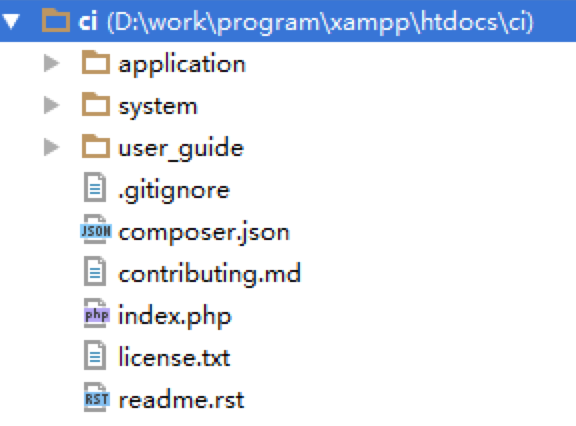
下面我们来查看一下文件结构。
user_guide 目录是用户手册,和网站是一样的,你可以安全的删除这个目录。
system 目录是CodeIgniter的系统,一般情况下我们不用去管他。
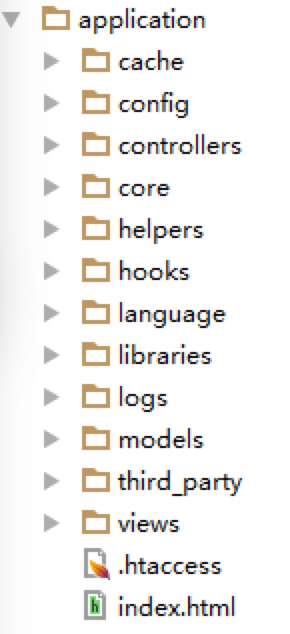
application 目录是我们的工作目录。我们来仔细查看一下。
这里面我们可以看到models,views和controllers三个目录,ok,这就是我们mvc的目录,暂时我们知道这三个目录就OK了,最多我们还要知道config配置目录。
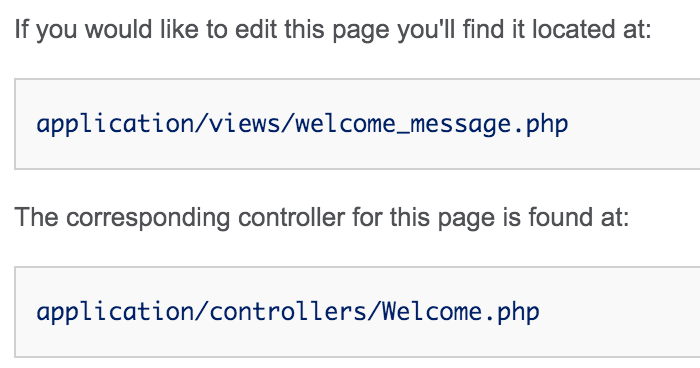
我们在浏览器中访问主页,会注意到下面的提示:
这个说明了,如果我们想要修改页面在application/views/下面直接修改welcome_message.php即可。如果我们查看这个页面,这个就是简单的HTML。
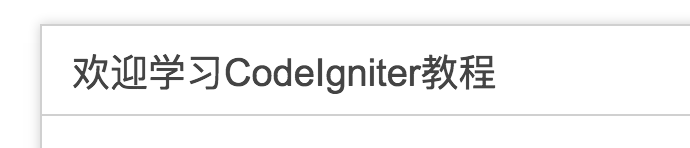
我们把h1修改一下:
1
< h1 > 欢迎学习CodeIgniter教程</ h1 >
保存后刷新页面。
非常重要的事情:如果你在浏览的时候,中文出现了乱码,一定要查看 1、<meta charset="utf-8">这个是否在你的文件中,2、如果你使用PhpStorm检查右下角当前文件的编码,如果你用中文系统,很可能是GBK,把他修改为UTF-8。
页面虽然修改了,但是我们会发现为什么我嫩只是直接访问http://localhost/ci这个地址,而会显示这个页面,这个有什么关联么?
在MVC中,controller控制着一切,让我们查看一下controller目录。在下面我们会看到Welcome.php这个文件。
 1
 2
 3
 4
 5
 6
 7
 8
 9
10
11
12
13
14
15
16
17
18
19
20
21
22
23
24
25
<? php
defined ( 'BASEPATH' ) OR exit ( 'No direct script access allowed' );
class Welcome extends CI_Controller {
/**
* Index Page for this controller.
*
* Maps to the following URL
* http://example.com/index.php/welcome
* - or -
* http://example.com/index.php/welcome/index
* - or -
* Since this controller is set as the default controller in
* config/routes.php, it's displayed at http://example.com/
*
* So any other public methods not prefixed with an underscore will
* map to /index.php/welcome/<method_name>
* @see https://codeigniter.com/user_guide/general/urls.html
*/
public function index ()
{
$this -> load -> view ( 'welcome_message' );
}
}
Welcome派生自CI_Controller这个类。这个控制器有一个方法index,这个方法中我们可以看到装载视图welcome_message。我们修改这个方法一下,不再装载视图,而是输出一个字符串:
1
2
3
4
5
public function index ()
{
// $this->load->view('welcome_message');
echo 'This is the welcome controller' ;
}
再次浏览,就会发现页面变化了。
添加方法
做一个测试,将index方法的名字修改为其他,例如test再次访问,会发现出现了错误,只有index方法可以作为默认的方法被访问。
如果我们增加一个方法,
1
2
3
4
public function test ()
{
echo "this is test funtion" ;
}
在浏览器中访问http://localhost/ci/test会出现错误,那到底怎么访问呢?在welcome.php里面的注释中说明了如何访问:
1
2
3
* http :// example . com / index . php / welcome
* - or -
* http :// example . com / index . php / welcome / index
所以访问test方法的路径是http://localhost/ci/index.php/welcome/test,测试一下。在CI中,index.php是入口文件,所有的访问都通过这个文件进行转发。
如果忽略路径中前面的部分,我们访问的方式就是{控制器/方法}。
添加控制器
我们来创建一个自己的控制器,在controller目录中新建文件Home.php
 1
 2
 3
 4
 5
 6
 7
 8
 9
10
11
12
13
14
15
<? php
/**
* Created by PhpStorm.
* User: jingl
* Date: 2016/2/11
* Time: 13:27
*/
class Home extends CI_Controller
{
public function index ()
{
echo 'this is the home controller at index' ;
}
}
访问http://localhost/ci/index.php/home,index是默认方法,不需要显示的说明。在views目录中新建视图文件home_index.php
 1
 2
 3
 4
 5
 6
 7
 8
 9
10
<!doctype html>
< html lang = "en" >
< head >
< meta charset = "UTF-8" >
< title > Document</ title >
</ head >
< body >
< h1 > Hello, CodeIgniter!</ h1 >
</ body >
</ html >
虽然我们的扩展名是php,但是这个文件仅仅是简单的html,修改Home.php控制器,装载视图
1
2
3
4
public function index ()
{
$this -> load -> view ( 'home_index' );
}
刷新页面, 查看结果。
模型和数据库
我们来创建一个数据库,当然是使用MySQL了。
 1
 2
 3
 4
 5
 6
 7
 8
 9
10
11
create database ci default charset utf8 ;
use ci ;
create table users (
id int auto_increment primary key ,
name varchar ( 255 ),
password varchar ( 255 ));
insert into users ( name , password ) values ( 'Zhang Jinglin' , '123' );
insert into users ( name , password ) values ( 'Jinglin Zhang' , '123' );
有了数据库以后,我们要告诉CI如何访问我们的数据库。在config\database.php中,修改hostname username password database即可,其他的属性不管,非常简单。
1
2
3
4
'hostname' => 'localhost' ,
'username' => 'root' ,
'password' => '' ,
'database' => 'ci' ,
现在,我们的CI就知道如何访问数据了。
我们来创建模型,在models目录下创建User_model.php
 1
 2
 3
 4
 5
 6
 7
 8
 9
10
11
12
13
14
15
16
17
18
19
20
<? php
/**
* Created by PhpStorm.
* User: jingl
* Date: 2016/2/11
* Time: 13:46
*/
class User_model extends CI_Model
{
public function get_users ()
{
//通知CI装载数据库组件
$this -> load -> database ();
//查询数据库,获取所有users表中的内容
$query = $this -> db -> get ( 'users' );
//返回查询结果
return $query -> result ();
}
}
有了模型,下面创建一个User.php控制器,
 1
 2
 3
 4
 5
 6
 7
 8
 9
10
11
12
13
14
15
16
17
18
19
20
<? php
/**
* Created by PhpStorm.
* User: jingl
* Date: 2016/2/11
* Time: 13:50
*/
class User extends CI_Controller
{
public function index ()
{
//通知CI,装载模型
$this -> load -> model ( 'user_model' );
//通过模型获取结果
$result = $this -> user_model -> get_users ();
//调用PHP函数输出数组
print_r ( $result );
}
}
通过上面的代码我们已经可以访问数据库了,非常简单。
自动装载
我们的代码还有些小问题,在每一个模型类的方法中,我们都需要一句代码
1
$this -> load -> database ();
虽说不麻烦,但是总是重复毕竟是不好的。所以我们可以告诉CI把一些在我们应用中总是使用的组件给我们自动装载进来。在config\autoload.php中,修改
1
$autoload['libraries'] = array('database');
然后,在模型代码中,注释掉装载数据库的代码
1
2
3
4
5
6
public function get_users ()
{
//$this->load->database();
$query = $this -> db -> get ( 'users' );
return $query -> result ();
}
重新刷新并检查结果。自动装载除了可以加载CI的组件外,也可以加载我们自己定义的组件,比如,在我们的应用中,总是要使用User_model这个组件,我们也可以自动装载这个我们自己的组件。在config/autoload.php中,修改代码:
1
$autoload [ 'model' ] = array ( 'user_model' );
然后在我们的控制器方法中就不需要显示的转载模型了。
1
2
3
4
5
6
public function index ()
{
//$this->load->model('user_model');
$result = $this -> user_model -> get_users ();
print_r ( $result );
}
但是我个人是不推荐自动装载模型的,在方法中明确的装载模型是有利于代码的清晰度的,除非你有非常好的理由来自动装在模型。
把数据传送到视图
在控制器中我们可以装载不同的视图,在装载视图的同时,我们也可以把数据传送给视图,非常简单。
 1
 2
 3
 4
 5
 6
 7
 8
 9
10
11
class User extends CI_Controller
{
public function index ()
{
$this -> load -> model ( 'user_model' );
//把结果发在一个命名数组中
$data [ 'results' ] = $this -> user_model -> get_users ();
//在装在视图的同时,把数据传送过去
$this -> load -> view ( 'user_index' , $data );
}
}
创建视图文件,views\user_index.php
 1
 2
 3
 4
 5
 6
 7
 8
 9
10
11
12
13
14
15
16
17
18
19
<!doctype html>
< html lang = "en" >
< head >
< meta charset = "UTF-8" >
< title > User View</ title >
</ head >
< body >
< h1 > User View</ h1 >
< ul >
<?php foreach($results as $item): ?>
< li > <?php echo $item->name; ?> </ li >
<?php endforeach ?>
</ ul >
</ body >
</ html >
这就是如何把数据传送到视图中。